Categories
Solar & Power

Solar Power Upgrade Part 1: Self-Install Panel Mounting

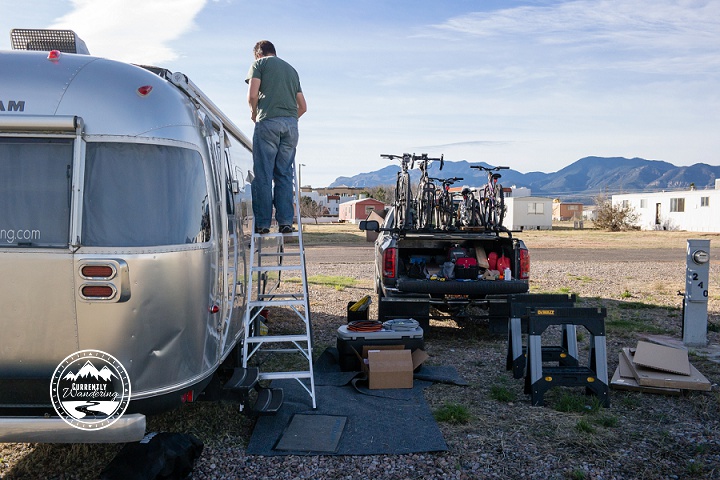
Power Upgrade on our Airstream! Read Part I about mounting the solar panels on the roof!!Our plan to self-install solar was a good one. We planned to mail the solar supplies to a friend’s house, then courtesy park for the install using his garage and tools. As it turns out, our awesome friends Ben and Emily live on an Army Base, with plentiful restrictions that foiled our plans. Our Plan B was a trailer/rv park just outside the base in Sierra Vista.

This RV Park might have been the dodgiest place we have ever stayed. Plenty of the single-wide mobile homes appeared abandoned. The gravel surface was covered with a goat-head like plant that produced painful, spiky stickers. The only benefit to this place was that nobody minded me doing a full solar install while I was there. Plenty of higher-grade RV parks have strict rules against maintenance of any kind, or even washing your RV. If you ever need management to stay out of your way during an install, this is the place!

Our schedule placed us there over the weekend. We arrived Friday, and I picked up the panels and some tools from Ben that night. Having a good plan, I only pulled out the install instructions and gave them a glance that night. Saturday was our Big Install Day, where I would try and get as much done as possible. I also squeezed in a trip to the hardware store, where I bought the cheapest 8 foot ladder I could buy.

We had three 135 watt panels to install, each shipped in it’s own box. The smaller additional box held everything else. The AMSolar people did a great job packing everything, and had included plenty of extras that made the install nice and easy. Crimp connectors, wire, heat-shrink tubing, and wire labels were all included in nicely labeled bags.

According to plan, the first step was to mount the panels on the roof. Using the sawhorses I borrowed, I pulled out each panel to install the rocker feet. The instructions were clear and easy. Each rocker foot had the 3M VHB (that’s Very High Bond) tape pre-applied. Before working with each panel, I taped one of the packaging cardboard pieces over the front. It was a sunny day, and I wanted to keep the panels from generating much electricity. For the first panel, I mounted the feet, then climbed up the ladder and set the panel on the roof. It fit nicely, and gave me some confidence that this whole crazy thing would work.

Solar project_15

The rocker feet sold by AMSolar (and included with the panel kits I ordered) were perfect for an Airstream roof install. The feet have a flat bottom where the VHB tape bonds with the roof. Three mounting holes provide a few height options, and a screw handle attaches the rocker foot to the mounting bracket that you install on the corner of each panel. The ‘rocker’ part of the foot is that the angle can change, allowing the panel to be mounted not entirely parallel to the surface of the roof. For a curved roof, this allows the foot to securely mount to the panel AND to the roof surface. Optional tilt bars allow easy tilting of the panels if you desire a better angle, and can be easily used by detaching the panels from the rocket foot and secured to the tilt bar at the desired angle. I’m not a panel-tilter, but it is a very nice option if you are.

Jess joined me outside to help me as much as possible. Despite much of the work being kind of a one-man job, the panel mounting was a perfect time for some extra help. I began to attach the UV-safe wire to the panels, route it on the roof over to the fridge vent, and cut it to just a bit longer than I thought I’d need. I tried to melt the shrink-wrap tubing using my wife’s 1800 watt hair dryer, but it just wasn’t hot enough. A quick trip to the hardware store yielded a small butane torch which managed to do a good-enough job. The AMSolar included instructions were also helpful here, helping me cut and strip the wires to the right length to attach them to the connectors mounted on each panel.Solar project_13
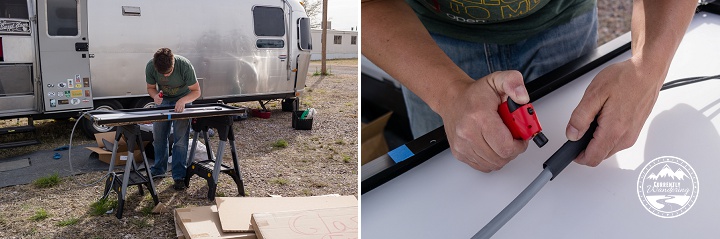
We began mounting the panels, first by marking the position of each foot. We then shifted the panel enough to clean the roof where the pad would attach. I used rubbing alcohol and a paper towel, and some elbow grease. We cleaned a generous size to make placement a little easier. The ladder I had was not one of the cool ones that you can climb up on both sides, so I was the only one on the ladder to mount the panels. After moving the panel into position, I propped up one end of the panel with two of the cardboard corners that came in the packaging of each panel. These held the panels high enough for me to peel the plastic off the VHB tape on those two feet, gently remove the cardboard supports,  and then lower the feet onto the roof in the desired place. I then moved the ladder to the other end of the panel, and repeated the process.

The rocker feet from AMSolar have three holes you can use. I experimented a bit with the first panel, and decided that the lowest setting gave me the clearance I needed to route the wires underneath. Being as low as possible would minimize the effect and force of the wind the panels would experience. During my purchase, AMSolar offered to sell me feet that were taller and would allow me to mount the panels to be flat on top despite the curved surface of the Airstream roof. I declined, as I wanted the panels to be angled slightly to follow the curve of the roof and keep the profile low.

At this point, I should mention a mounting option used by Dan of Malimish Airstream. Dan purchased a second set of rocker feet for each panel, and mounted the L shaped feet back to back at each point. This provided twice the surface area of VHB mounting tape with minimal fuss and nearly no additional work. Had I known/thought about his mounting option I would have done it. Overkill? Maybe, but inexpensive and easy.
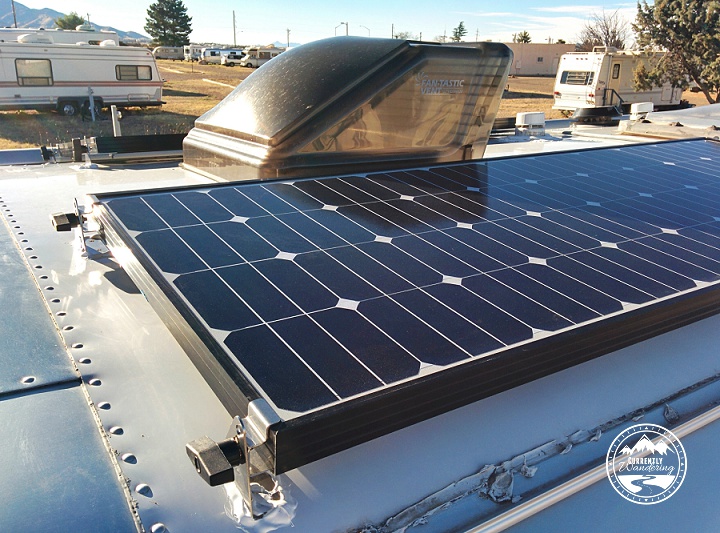
IMG_20150223_162758_1

I mounted all three panels with wires attached. Before the project was over, I used Dicor Lap Sealant to seal around the edges (and screw holes!) of each rocker foot. I should note that the picture above doesn’t show the full lap sealant application, as I also covered the top of the foot to cover the spot where the tape can be seen through the screw holes. But I’m getting ahead of myself, and I’ll cover that later. The next step of the project is wiring the panels into the combiner box.

Categories
Finances & Money

Budgeting 201 – Using Toshl To Keep Track of Spending

Budgeting 201 – Using Toshl To Keep Track of Spending

A few weeks ago I posted about how we set up our budget. This week I’m going to share how I keep track of everything once it has been budgeted!

Software like Quicken & Mint are GREAT  if your brain can handle a whole month of lots of categories at a time. Turns out I can’t. I can’t say I have $150 to spend on dining per month, and maybe $50 on clothes for the whole month. It never worked. I was NEVER in my budget and it was completely frustrating. Some months I spent $200 on dining, and $0 on clothes and I felt that these software choices didn’t account for that. Plus, I just had WAY to many categories and it drove me crazy.

It was also difficult and complicated even with the mobile app. It just never happened in the moment that I spent my money.

After a frustrating few years of tracking all of our expenses in Quicken, and then Mint and not being able to stay under in any of my budget categories, I discovered Toshl. For some reason, this way of budgeting just clicked with my brain and I’ve been doing pretty good at staying withing our set budgets ever since.

Toshl is flexible enough that I can have my “discretionary” category, and its hard to let items just slip through the cracks. You can also track cash really easily (all our laundry is paid with quarters) something Quicken & Mint were never good at.

To set up more than one budget, you do need the Premium Version. It’s totally worth the $19.99 annual fee to be able to set up multiple budgets.

If you’ve read my previous financial post on determine our budget amounts, you’ll notice that my variable spending categories are also my budgets in Toshl: Discretionary, gas, camping fees, groceries & propane.

Screenshot_2014-12-13-09-37-51

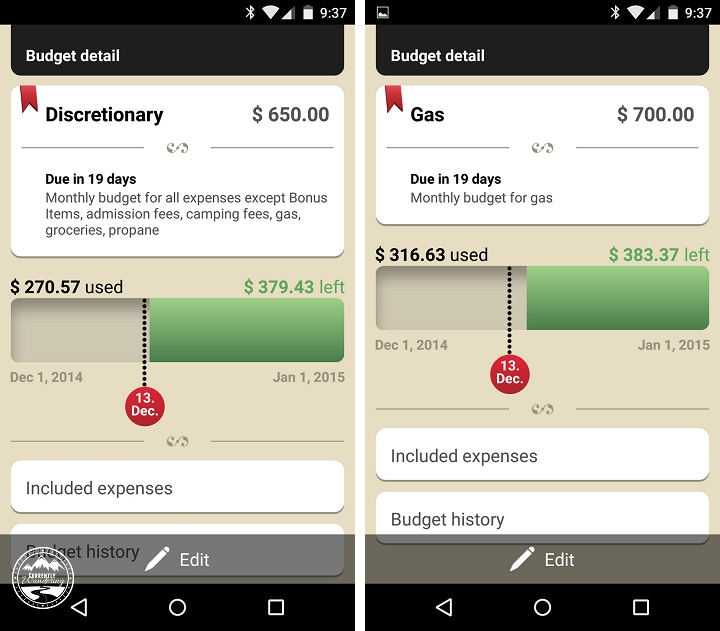
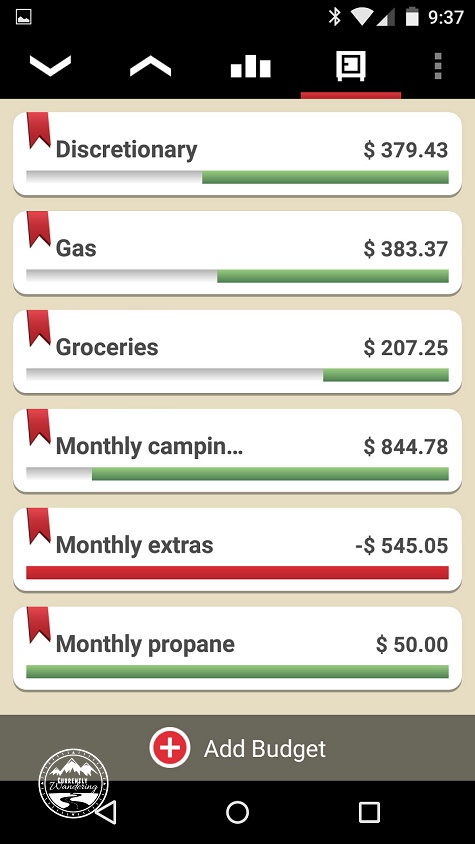
Here’s a view of an individual budget. My favorite part is that black dotted line. It helps me know where I am in relation to the rest of the month. Have I totally overspent? Do I have a lot of money left over? For my discretionary budget in this case I’m pretty close – gas we are a little bit over so far in the month. This helps me know that I need to cut back, or if we have a little extra money to splurge going out to ice cream!

Screenshot_2014-12-13-09-37-35

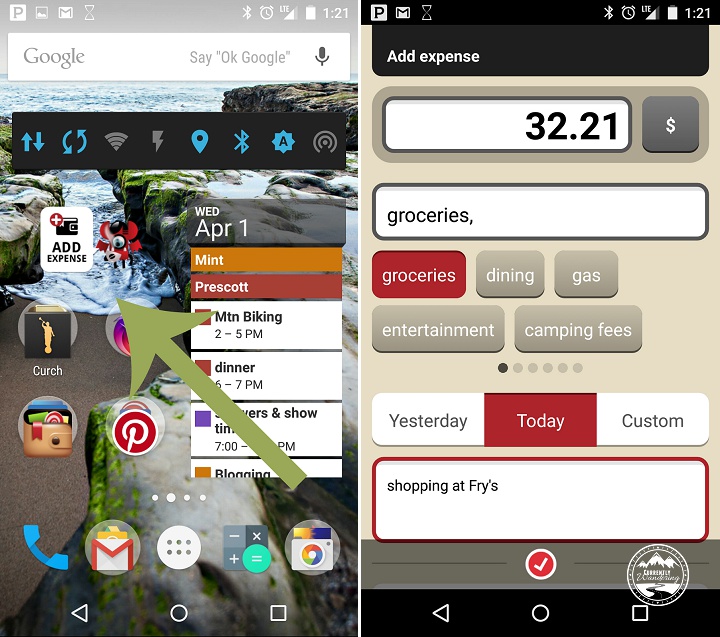
It’s super easy to add expenses as they occur, especially those pesky cash expenses that I can never remember later. I have a widget on my home screen that I just tap, enter in the information, tap the check mark and its done!

Screenshot_2015-04-01-13-21-32

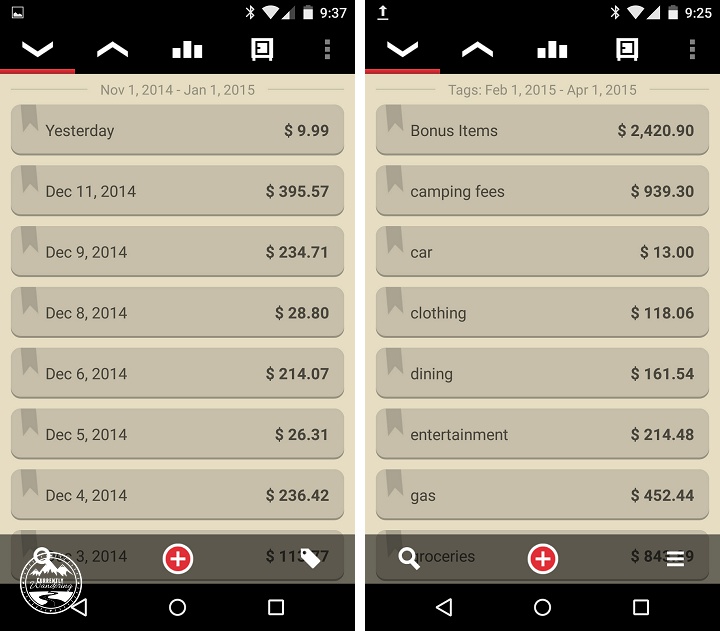
You can view expenses in a list either by date or by category which is super helpful when I sit down with Mint twice a month and double check that everything has made it in to Toshl (yes, I still use Mint.com for overall tracking as its super helpful come tax season!).

Screenshot_2014-12-13-09-37-57

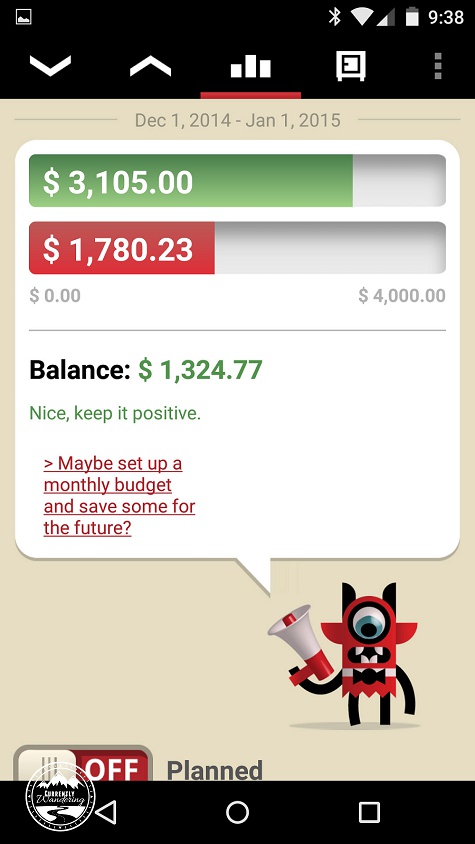
I’ve also set our amount for variable spending (paycheck – fixed expenses) under “income” so I can keep track if we are under or over across the board. Sometimes we go way over on groceries (like last month!) but we are way under on gas and groceries. I figure as long as my balance is positive I’m doing pretty good for the month!

Screenshot_2014-12-13-09-38-03Excited yet? I seriously love this app, and no, we weren’t paid to write this article. 🙂 I hope this helped give you a brief overview of how I work and keep track of our budget. If you want to just give it a try, sign up for free and test out tracking one budget category and see how it goes!

Having control over our finances and really understand where our money was going has helped increase our confidence that we can make this lifestyle work for us!

What about you? Any financial tools you’ve found to be super useful?

Image Credit: 401kcalculator.org

Categories
Finances & Money

Budgeting 101 – How I Determine Our Budget

6355836713_7ea15f733f_bI’ve put off this post for months. I think every time I post a “How Much Does It Cost to Live in an Airstream” I mention that the numbers don’t include EVERYTHING, just what is unique to our particular lifestyle. There really is another side to that coin, however, that includes long term planning like college funds, retirement, insurance and other life necessities that are more personal. To give you a better idea of how we make our travels work financially, I thought I’d break down the rest of our numbers and give you an idea of how we budget our money. Sound good? Okay, hold on because my brain thinks in complicated ways.
Two Types of Spending

For me, there are two different categories of spending: fixed and variable. Fixed spending is anything that is the same dollar amount every month, while variable spending varies from month to month. Simple enough.

Examples of fixed spending include: life/ health/car/dental insurance, HSA contributions, cell phone bill, church contributions, truck & Airstream loans.

Examples of variable spending: camping fees, groceries, dining out, clothing, propane,  gas, entertainment, and laundry.

The reason these are “variable” is that they are not a fixed number. Some months we spend more on groceries, some less. Anything I don’t know an exact amount for falls into this category.

Do the Math

Once I figured out what fell into the two categories I did a little math. I took our paycheck and subtracted the total fixed spending amount, which provided me with how much we had “leftover” after the bills were paid for our variable categories.

Paycheck – Fixed Spending = Variable Spending

The best part of thinking like this, was that I no longer had to worry about the fixed spending amounts. They never changed. The only numbers I have to think about on a monthly basis are the smaller variable spending amounts.

Ballpark Your Spending for Larger Variable Categories

Once I had a number for my variable budget, it was time to divide it up. Just because our spending changed every month, didn’t mean that I shouldn’t have a specific number to shoot for in my various categories. I can’t just take a budget of $3,000 and choose randomly where to spend it, otherwise we wouldn’t be able to eat because I’d spend it all on clothes (not really, but you get the idea).

I picked the 4 most regular categories and gave those a number:

Camping Fees: $970.00/month
Gas: $700.00/month
Groceries & Household Items for Family of 5: $700/month
Propane: $50/month

Since I didn’t know exactly where to start with these numbers (Camping Fees started out at $1200 when we first started out), I picked something I felt was in the ballpark and have adjusted the amount as I’ve received more data over the months.

Find Out What is Leftover

Since those aren’t the only things we spend money on every month (you might have noticed our rather large dining out category every month) I still needed to figure out what we had left to spend on everything else.

To figure out what I had left, I did a little more math:

Variable Spending Amount (from previous equation) – Camping Fees – Gas – Groceries – Propane = Discretionary Budget.

This is where I finally felt like a genius. Why does it matter WHAT I spend my money on as long as I don’t go over my allotted amount? Right? Maybe one month we are in Portland and want to stuff our faces, and the next month we need to buy everyone new clothes and eat at home every night?

So my “Discretionary Budget” includes everything else: clothes, dining out, hair cuts, entertainment, laundry, small home improvement projects, etc.

I originally broke this budget down even farther so I had a weekly allotted amount, but once again I had trouble sticking to it. Some weeks we don’t spend anything because we are out in the middle of nowhere, and others we just spend a lot. Once I switched to a general monthly amount things went a lot smoother.

Save What You Don’t Spend

Since our variable costs, well, vary there can be months where we spend a lot, or months where we spend very little. The winter months in the southwestern US (Arizona, New Mexico, Nevada) are usually very low on camping fees. We dry camp a lot, or stay in low cost state & national park campgrounds. In contrast, December 2015 we are planning on staying in the Florida Keys. Turns out that’s REALLY expensive. Any month we have leftover in our budget during the slower months, I transfer from our checking account into our savings account and pull out again when needed to make up the difference.

It’s not a perfect system, but my brain can wrap itself around the numbers and generally keep us on track month after month. Later this month I’ll post about the budgeting app I found (and LOVE) that helps me stay in the green so stay tuned for that!

Image Credit: 401kcalculator.org

Categories
Solar & Power

Power Upgrade: My Plan for Self-installing Solar

IMG_2362-Edit copyAfter evaluating our needs, and figuring out what I don’t know about installing solar, we sought for recommendations for a professional installer. We began conversations that started good, and gradually got worse and worse. This happened while I was camping just next door to Dave Zimmerman in the middle of the Mojave Desert. Dave happens to have nearly the exact setup I was considering, so took a peek under his couch to study the wiring a bit.
After a bit of reading and conversation, I’ve determined to try and install this all myself. It will save some cash, allow us to control our own schedule, and I can be sure it is done in a way that I’m pleased with. I’ve mailed the panels to a willing friend in Arizona, and we’ll do the install at his house. The install seems to fit in 3 distinct phases, with the ability to ‘pause’ in between each.

Phase 1: Rooftop work

In this phase, I’ll attempt to do all the roof-top work. I’m going to mount the panels using the crazy sticky 3M tape that AM Solar ships with the kits. After mounting, I’ll use some lap sealant around the mounting point to protect the adhesive from the elements. I’m installing 3 135 watt panels, one in each corner of the Airstream, skipping the corner with all the antennas.

I’m going to use a fridge vent combiner box, and run the wires down behind the fridge and into the under closet space. Each panel will need to be wired to the combiner box, and there is some wire work on each panel as well that involves crimping and some heat-shrink tubing. I’ll need to pull the fridge to run the wire down from the fridge vent, but I’ve done that twice before, and the last time I didn’t even empty it!

At the end of this phase, I’ll have panels on the roof, and wire down inside the house. Taking care to keep the end of the wire wrapped and insulated, I can pause here, leaving the coil of water under the wardrobe.

Phase 2: Wire run

Nearly all of the wiring needs to be joined together at the front of the Airstream, as close to the batteries as possible. The main wiring panel is under Cara’s bed, so I’ll need to get the wire from the panels run forward to that space. From under the wardrobe, I’ll use an existing wire chase that runs under the floor to thread the wire across the hall and up behind the wiring panel. I’ll then run the wire past the hot water heater, behind the bathroom lower cupboards, along the wall underneath one of the front kids beds, and into the wiring space.

In addition to the wire from the panels, I’ll need to add the remote wires that connect to the BlueSky control panel. I’m mounting this in the kitchen cabinet, located conveniently above the wiring panel. I’ll cut a hole in the cabinet, and run the two control wires down to the floor to join the wire bundle before it heads back past the hot water heater. There are two small wires to run: one is the control wire from the solar charge controller, and the other is the sensor wire from the battery monitoring shunt that will allow accurate measurement of battery use and charging. I’ll install the controller into that hole as well, though it won’t be connected to anything till the next phase.

While I’m doing this run, I’m going to run a length of romex AC wiring cable from behind the electrical panel to the forward space as well. While I’m not going to use this wire now, it will come in handy if I add an inverter and wire it to the house outlets.

That bundle will be secured and wrapped when exposed to protect it during it’s run. At the end of this phase, I can leave the still carefully isolated wires wrapped underneath the forward bed.

Phase 3: Wire it up!

This is the most interesting phase of it all, as it contains the most unknown issues. I’ll need to rewire the house wiring in a few specific ways to connect the solar and monitors.

First, I’ll need to re-arrange all the electric pieces placed by Airstream. This will allow some more room for the additional components I’ll be installing. I’ll mount the BlueSky charge controller in the newly available space. The solar wires will be wired first to a cutoff switch, and then to the charge controller. I’ll connect one remote cable from the control panel there as well, and add the battery temperature monitor cable as well.

I’ll be rewiring the house wiring so that the negative battery connection is run through the monitoring shunt. I’m going to attempt to do a clean, full install there, including rewiring the electric jack behind the shunt as well. This will allow for a full system monitor to capture and understand ALL of my power use and charging activity. This job might be the most time consuming, as there are lots of wires to adjust and reroute. The final bundle will need to be re-protected on it’s route from the battery box into the wiring panel. That shunt will be connected to the monitoring cable that was placed in phase 2.

The difficulty of this task is aided some by the wiring diagrams that I’ll receive with my solar kit from AM Solar. I’ve seen the diagrams already, and they are clear and easy to follow. If this part of the installation goes south, I’ll locate an automotive electrician to help me clean it up and get it working properly.

Am I crazy?

Possibly, but I’ll learn plenty during the process, and I’ll surely end up with some interesting stories to tell. I’m planning to do one phase each day, with some (paid) work in between. I’ll need to do almost everything during the day, so the kids have a place to sleep at night. If needed, I can pause for a few days between phases to normalize and take care of stuff.

Categories
Airstream Accessories Solar & Power

Power Upgrade: Drop-in Multi-stage Converter Upgrade for the Airstream

IMG_20150128_113838For some insane reason, our Airstream came from the factory with a single-stage charger. When connected to shore power (or a generator), the converter provides both 12V DC power to the Airstream, and also charges the house batteries. As a single-stage converter, it has only one mode: charge.

This single charge mode is neither fast nor smart. It takes a few days to charge the house batteries fully, and then will continue applying the charge, causing the flooded cells to boil and the electrolyte liquid to evaporate.

A bit over a year ago, I had replaced our two Group 24 flooded batteries, and in the following year, our lovely single-stage converter had boiled enough liquid out of the batteries to cause a significant decrease in capacity. I set out to resolve the issue, first with a new set of batteries, and then a converter upgrade.

Our Airstream came with a Parallax 7355 power center. The unit has both a converter in the lower section, and AC and DC distribution panels in the upper section. I found a new converter designed to be a drop-in upgrade to the converter portion of the power center. The Progressive Dynamics 55 amp (PD4655V) unit was the right drop in replacement. I found it first over at bestconverter.com, but I couldn’t get them on the phone to ask about shipping time. I ended up ordering the unit from Amazon (Prime Shipable!) and had it shipped to Heather and Jeff (AudreyAirstream) who lived nearby. (Thanks again!)

Installation

I didn’t install the unit till we were in Death Valley, where I pulled out my tools to do the drop in replacement. In hindsight, this was a bad plan. If anything went pear-shaped, the nearest hardware store was quite a drive. Nothing bad happened during the install, and it worked fine.

The back side of the power panel, with screws to loosen to allow slack in the wires.

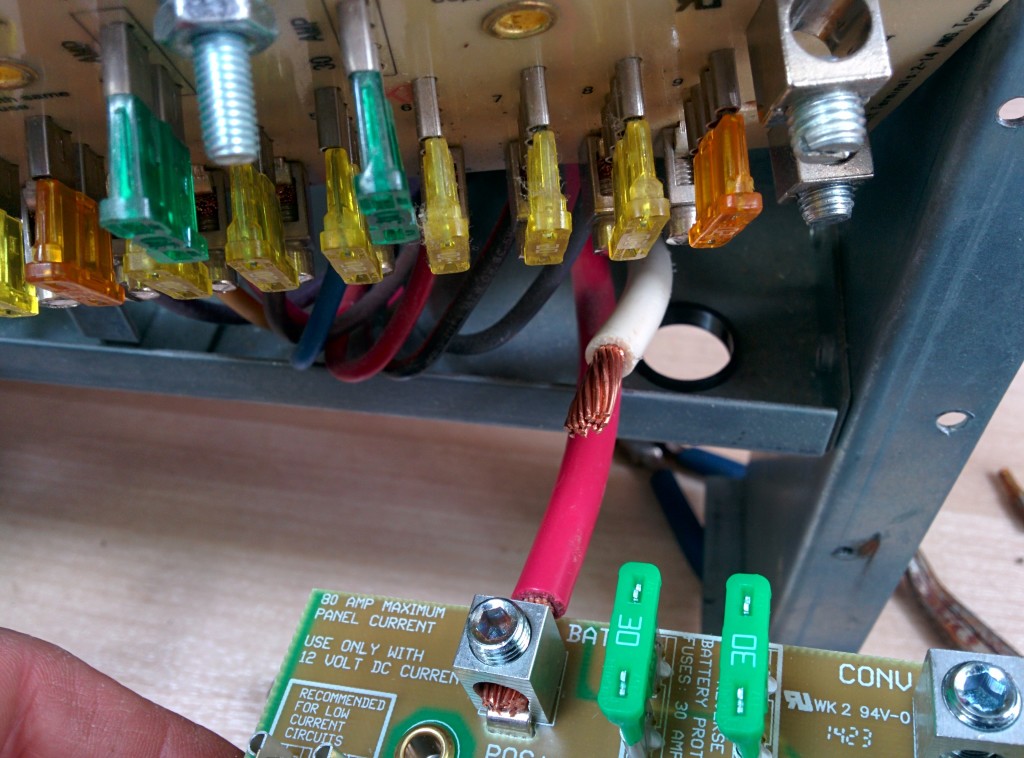
I used only a screwdriver (with a few assorted tips) and a pair of pliers for the install. The instructions included with the new converter were pretty clear. I removed the old converter, and then moved all the wires from the old DC distribution board to the new DC distribution board. This was the most difficult part, because the old board had the connections on the bottom of the front panel, and the new board had the connections on the top of the distribution panel. Wrangling the huge-gauge wire was a little hard, but manageable.

The only thing I did different from the instructions was pull out the whole power center unit (only a couple of screws) so that I could loosen the clamp around the wires to the battery. With loose wires, I could manipulate them into their new routing path around the top of the board. Getting the new distribution board screwed back into place took some finagling, as I needed to get the wires positioned just right, and the large-gauge wire was difficult to bend.

Done

After finishing the wire connections, I reconnected the battery and started up the generator. It worked! The new converter board has a LED light on it which indicates it’s status. Constant means bulk charging mode, fast blink means trickle charge (last 90%), and a slow blink means float mode.

It is worth noting that the LED is on all the time, even if no AC is connected and no charging is occurring. For the past few weeks, the light has operated as my poor-man’s battery monitor, at least in the higher stages of charging.

So that’s all there is to it! For only $200ish, I have can reduce my generator time and avoid cooking my batteries.